

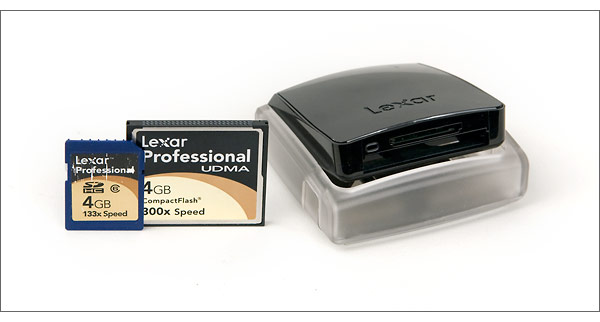
Lexar’s Professional UDMA card reader is a compact, collapsible memory card reader with slots for SecureDigital and CompactFlash memory cards. It has a USB 2.0 interface and can read the new UDMA CompactFlash cards as well as high-capacity SDHC SecureDigital memory cards. I’ve been using the Lexar Professional UDMA reader in the office and on the road for a few months now and recently tested it against a couple of other card readers.
Lexar UDMA Card Reader Design
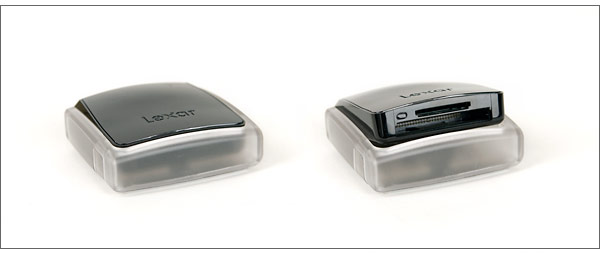
I really like the compact size of the Lexar Professional UDMA card reader and the way it closes up to protect the card slot connections. I’ve had connector pins bend in readers while I’m on the road and that’s very, very bad if you’re working and need to download photos in a hurry. The Lexar reader has buttons on either side. Press both buttons and the spring-loaded reader pops up, revealing the SD and CompactFlash card slots. Although the reader feels sturdy, I had one of the buttons break while it was traveling in my laptop bag. And I even had it in a padded envelope to protect it. It still opens and closes fine but it’s not as pretty as it was when I first got it. Between the button breaking and the glossy finish, I think Lexar should include a small, protective case to ensure the card reader doesn’t get damaged or scratched. Since it is collapsible, it appears designed for travel and a case would make perfect sense. It just seems like an obvious accessory to include with a card reader that’s designed for traveling pros.
Lexar UDMA Card Reader Testing & Performance
I tested the Lexar Professional UDMA reader with three memory cards, a SanDisk Extreme III CompactFlash card, a Lexar Professional UDMA 300x CompactFlash card, and a Lexar Professional 133x SDHC card. I also tested it against two other card readers, a Lexar Professional FireWire reader and a SanDisk USB 2.0 multi-slot reader. For testing, I put 186 Canon XTi / 400D RAW files – 198 GB worth – on each card and timed how long it took to transfer them to my desktop PC (3 GHz Pentium 4 desktop with 1 GB of RAM). The first thing I noticed was how much slower my FireWire reader is. For a standard pro-level CompactFlash card (the SanDisk Extreme III), it took about 3 and a half minutes to transfer all the files. Both USB 2.0 readers make the FireWire reader look positively pokey, transferring the files in about 2 and a quarter minutes. The FireWire interface is the bottleneck of course, not the actual reader. But if you’re still using first generation FireWire, you’ll save a lot of time if you step up to a USB 2.0 card reader.
With standard CompactFlash and SDHC cards, the Lexar and SanDisk readers performed about the same, with the Lexar negligibly faster. The UDMA card was a different story. It was wayyyy faster in the dedicated Lexar Professional UDMA reader. The SanDisk reader transferred the 198 GB of files in 2 minutes and 19.5 seconds. Compare that to 1 minute and 41.7 seconds in the Lexar Professional UDMA reader. That makes the Lexar UDMA reader about 37% faster. At close to 4 minutes to transfer all the files, the FireWire reader isn’t even in contention. If you’re downloading a lot of photos, that time makes a difference. When I’m shooting a mountain bike event and have to download cards on my lunch break, every second counts. I can’t afford to be waiting for cards to dump to my laptop when a race is starting.
Conclusion
Obviously, it pays to have a UDMA card reader if you own a UDMA CompactFlash card. The time saved is significant and photographers who shoot a lot will appreciate the notably faster transfer rate. Although I didn’t get a chance to test the Lexar Professional UDMA reader against another UDMA reader, I think it’s a fine buy – as long as you keep it protected. It feels sturdy enough but the buttons on the side proved to be a little delicate. But it’s the transfer performance that counts. And in that regard, the Lexar Professional UDMA USB 2.0 card reader is worth the investment.
Write A Lexar Professional UDMA Card Reader Review >>
Related Content:
Lexar Professional UDMA USB 2.0 Card Reader User Reviews
All Card Reader Reviews
All Lexar Reviews
Digital Camera Memory Card Guide
All Lexar News
Lexar Web Site


I also own the Lexar USB 2.0 UDMA dual format reader. I use it every single day often several times. It travels with me at all times in my camera bag unprotected, and has stood up to several months of professional use with only cosmetic wear and tear on the glossy black top. The speed and USB interface are perfect for use with my MacBook Air and UDMA CF cards.
John, one thing to consider is the type of computer you’re using. It is possible that the firewire interface you’re using in the computer has bad drivers or is set to s100 speed instead of s400. USB 2.0 is not as fast as even firewire 400 at sustained transfers. It may be that reader itself.
I tested this reader when it came in against the Lexar Professional UDMA Firewire 800 reader using both FW800 and FW400 on a MacBook Pro. I tested both Lexar and SanDisk UDMA cards. The FireWire reader was noticeably faster, though we’re talking a few seconds here.
Thanks for the review. Interesting you find the firewire slower…in theory it should be faster right? My question is if you have had any experience with the Professional UDMA Firewire 800 CF Reader. I am interested in the idea that you can download 4 cards at the same time but haven’t found any reviews on the product from users. I’m a professional photographer and often am shooting on location and need to download a days work and get everything ready to shoot again the following day. Wondering if you know anything about this reader or, if you are planning a review on it. I’ve heard the older generation multiple card readers don’t really work very well.
Janet-
Thanks for reading me review and commenting.
You forced me to do some worjk here! I did some follow-up research on the USB 2 and Firewire interfaces so I could answer your question. My Firewire card reader is an older one. It’s FireWire 400 (IEEE 1394-1995) standard, which can transfer a maximum of 49 MB per second – if my Firewire card is configured correctly. And I can’t say for sure that it is. The USB 2.0 interface is faster, though. It can transfer up to 60 MB per second. The FireWire 800 (IEEE 1394b-2002) interface is the fastest of the three, though. It’s twice as fast as FireWire 400 and should be able to transfer almost 100 MB per second. So the Lexar Professional UDMA Firewire 800 CF Reader should be super fast.
I have to assume you made a typo here?
“For testing, I put 186 Canon XTi / 400D RAW files – 198 GB worth”
Since USB’s MAX speed is 60Mb second (100% efficiency) the most you could have possibly transferred in 2m 17s is 8220 Mb or roughly 8 Gigs.. [in a perfect world] Do you mean 1.98 Gigabytes? Possibly 198 Megabytes?
Also.. as there is no such thing as 200GB + CF Card….
I agree that 195Gb must be a typo, but for comparison I have just benchmarked a £12-50 Ebay clone. This transferred the entire contents of a SanDisk Extreme III CompactFlash 4Gb card in 3 minutes, which I make a transfer speed of approximately 22 750 000 bytes per second, or 22MB/s in round numbers,